You can leave any school which you are a member of, if you are not linked to a student at that school. To leave a school:
1) Log into your School-Day account.
• For more information about Logging Into School-Day [http://support.school-day.com/en/articles/logging-into-school-day-from-the-school-day-website] , click on the link provided or see related articles.
• For more information about Creating An Account [http://support.school-day.com/en/articles/creating-a-school-day-account] , click on the link provided or see related articles.
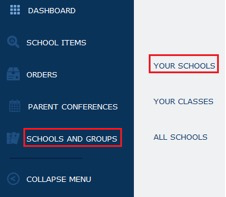
2) Click on Schools and Groups, and then click on Your Schools.
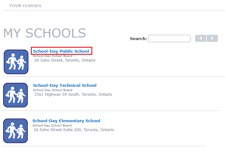
3) Click on the school name link of the school you are a member of and wish to leave.
4) On the school page, click the Leave School button.
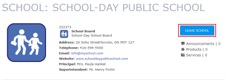
• If you do not see the Leave School button on the school page, this means that you are linked to a student at that school, and therefore cannot leave the school.
• If your student no longer attends the school, but you do not see the Leave School button, it is possible that the data the school sends School-Day still has the student linked to the school. Please contact the school to ensure they no longer appear at that school in the school's internal student information system.
5) Click Leave School again on the pop up to confirm.
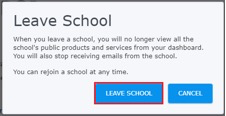
• When you leave a school, you will no longer view the school's public Products and Services from your dashboard. You will also stop receiving emails from the school.
• If after you leave a school you are still receiving emails from that school, please contact School-Day Support.
Was this article helpful?
That’s Great!
Thank you for your feedback
Sorry! We couldn't be helpful
Thank you for your feedback
Feedback sent
We appreciate your effort and will try to fix the article