Parents with step by step instructions for cancelling an appointment. If you wish to change an appointment, you can easily cancel your original booking and then re-book a new appointment.
1) To access your Parent-Teacher Conference schedule, log into School-Day.
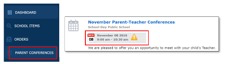
2) Select the Parent Conferences link from the left side of your Parent Dashboard and click on the icon of the Conference itself to access the schedule for booking.
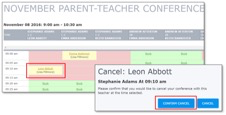
3) Click on your child's name in the schedule for the appointment you wish to change and select Confirm Cancel.
Was this article helpful?
That’s Great!
Thank you for your feedback
Sorry! We couldn't be helpful
Thank you for your feedback
Feedback sent
We appreciate your effort and will try to fix the article