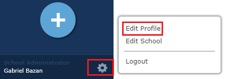
1) Click the settings icon on the bottom left of your dashboard.
2) Click Edit Profile.
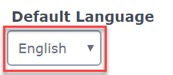
3) In your Profile, the default language is English.
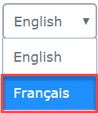
4) To change your Default Language to French, select Français from the drop-down menu and click Update.
5) Default Language controls the language in which School-Day displays system information, and not content. Content is displayed in the language in which it is created. The choice made will be specific to only your account.
Was this article helpful?
That’s Great!
Thank you for your feedback
Sorry! We couldn't be helpful
Thank you for your feedback
Feedback sent
We appreciate your effort and will try to fix the article