If you prefer to use School-Day in a language other than English, you can easily change your default language settings. Here's how:
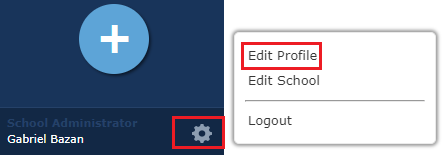
1. Start by clicking the settings icon located on the bottom left of your dashboard. This will open up the settings menu.
2. Next, click on "Edit Profile" to access your profile settings.
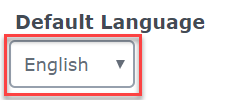
3. In your Profile, you will see that the default language is set to English.
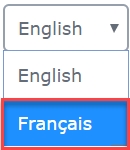
4. To change your Default Language to French, simply select "Français" from the drop-down menu and click "Update" to save your changes.
5. It's important to note that the Default Language setting controls the language in which School-Day displays system information, such as menus and buttons. However, it does not affect the language of the actual content, which will be displayed in the language it was created in. Additionally, the language choice you make will only apply to your specific account.
By following these simple steps, you can easily customize your School-Day experience to be in the language of your choice. If you have any further questions or need assistance with changing your default language, feel free to reach out to our customer support team for help. We're here to ensure that your experience with School-Day is as seamless and enjoyable as possible!
Was this article helpful?
That’s Great!
Thank you for your feedback
Sorry! We couldn't be helpful
Thank you for your feedback
Feedback sent
We appreciate your effort and will try to fix the article