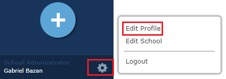
1) Click the settings icon on the bottom left of your dashboard.
2) Click Edit Profile.
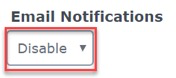
3) In your Profile, Email Notifications are defaulted to Disable. When set to Disable, you will not receive Email Notifications for items posted that require approval.
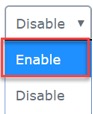
4) To change your Email Notifications to Enable, select Enable from the drop-down menu and click Update. When set to Enable, you will receive an Email Notification for each item posted that requires approval.
Was this article helpful?
That’s Great!
Thank you for your feedback
Sorry! We couldn't be helpful
Thank you for your feedback
Feedback sent
We appreciate your effort and will try to fix the article