To edit your account information, including your name, email address, or any other information contained in your profile page, follow these steps:
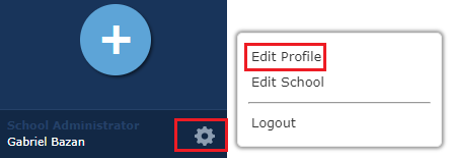
1) Click the settings icon on the bottom left of your dashboard: The settings icon is usually represented by a gear or a similar symbol. It is typically located in the bottom left corner of your dashboard. Click on this icon to access your account settings.
2) Click Edit Profile: Once you are in the settings menu, look for the option to edit your profile. This option is usually labeled as "Edit Profile" or something similar. Click on this option to proceed to the next step.
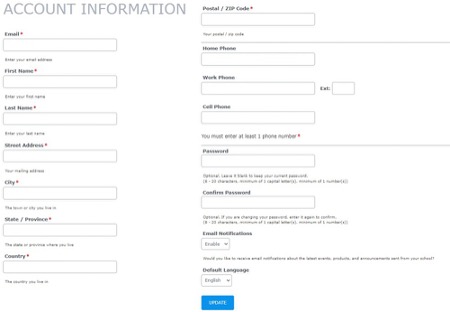
3) In your Profile, update whatever details you'd like and select Update: You will be directed to your profile page where you can make changes to your account information. Update your name, email address, or any other details as needed. Once you have made the necessary changes, be sure to click on the "Update" button to save your updated information.
By following these simple steps, you can easily edit your account information and ensure that your profile is up to date. If you encounter any issues or have any questions while editing your account information, feel free to reach out to our customer support team for assistance. We are here to help!
Was this article helpful?
That’s Great!
Thank you for your feedback
Sorry! We couldn't be helpful
Thank you for your feedback
Feedback sent
We appreciate your effort and will try to fix the article